
A lightweight WordPress plugin that fixes one of WordPress’ biggest hidden problems:
WordPress struggles to reliably turn events (orders, forms, users) into real-time communication and automation.
This plugin connects WordPress events directly to external communication systems using simple Form IDs.
No backend required.
Most WordPress sites face the same issues:
- Contact forms sit idle with no real-time follow-up
- WooCommerce orders are not instantly acted on
- User registrations are ignored after signup
- Teams rely on email inboxes instead of automation
- No central event pipeline for communication
Result:
Lost leads, slow response times, and broken customer communication.
StackVerify WordPress Plugin turns WordPress into a real-time communication engine.
Every important event becomes a structured signal:
- Order placed → instant event
- Form submitted → instant event
- User registered → instant event
These events are sent to StackVerify using Form IDs and can trigger:
- Email notifications
- WhatsApp messages
- Webhooks
- CRM workflows
- Internal automation systems
Instead of manually checking WordPress:
✔ Customers get instant responses
✔ Sales teams get real-time leads
✔ Orders trigger immediate workflows
✔ No missed communication
StackVerify WordPress Connector requires WP Webhooks to detect WordPress events and send data to StackVerify.
First install and activate the WP Webhooks plugin:
WordPress Dashboard → Plugins → Add New → Search "WP Webhooks"
Activate the plugin after installation.
Download the latest StackVerify Connector ZIP:
https://github.com/Stackmorgan/Stackverify-leads-wordpress/blob/main/stackverify-wordpress.zip
Click View Raw to download the ZIP file.
Go to:
WordPress Dashboard → Plugins → Add New → Upload Plugin
Then:
- Upload
stackverify-wordpress.zip - Click Install Now
- Activate the plugin
After activation, StackVerify will appear under:
WordPress Dashboard → Settings → StackVerify
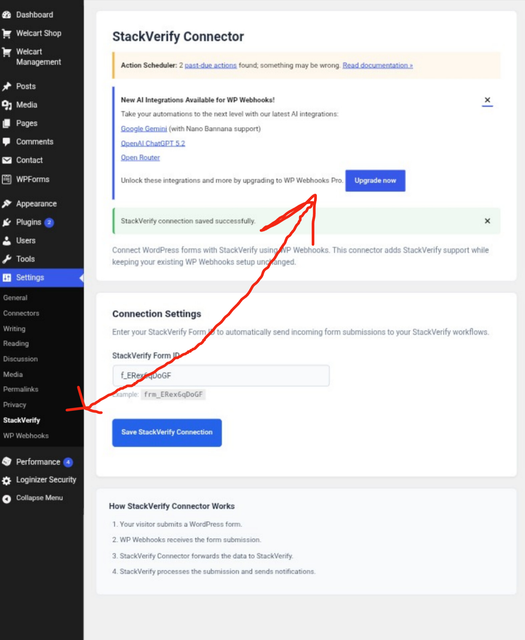
Setup steps:
- Create a form in the StackVerify dashboard
- Copy your Form ID
Example:
frm_orders
- Open:
WordPress → Settings → StackVerify
-
Add your Form ID
-
Select the events you want to send:
- WooCommerce Orders
- Contact Form Submissions
- User Registrations
- Save settings
Done.
WordPress Event Happens
        ↓
WP Webhooks detects the event
        ↓
StackVerify Connector captures the event
        ↓
Event is sent using your Form ID
        ↓
StackVerify processes the data
        ↓
Triggers communication (Email, WhatsApp, Webhooks, Automation)
The connector currently supports:
WooCommerce Orders
Contact Form Submissions
User Registrations
More integrations can be added through WordPress hooks and lightweight extensions.
Inside the WordPress admin dashboard, you can send a test event:
StackVerify → Send Test Event
This is used to verify:
- Plugin is correctly installed
- Form IDs are valid
- WordPress is communicating with StackVerify
- Event mapping is working as expected
This plugin is built on a simple principle:
WordPress should generate events, not manage communication logic.
Instead of building and maintaining:
- Email systems
- Webhook layers
- CRM integrations
- Notification pipelines
WordPress only focuses on capturing events, while StackVerify handles delivery and automation.
This keeps WordPress:
- Lightweight
- Faster
- Easier to maintain
- More scalable for real businesses
- This plugin does NOT store user data externally
- No tracking or background analytics
- Data is only sent when events occur
- You fully control what is transmitted via Form IDs
- No hidden requests or silent data collection
Latest stable versions are available here:
https://github.com/stackmorgan/stackverify-wordpress/releases
Each release includes a downloadable ZIP file for direct WordPress installation.
Future improvements planned:
- Auto-detect WooCommerce installation
- Auto-detect Contact Form 7 and WPForms
- Background queue for high-volume stores
- Retry system for failed event delivery
- Advanced event logs dashboard inside WordPress
- One-click StackVerify onboarding connection
- Zero-configuration mode (smart defaults)
MIT License
You are free to use, modify, and distribute this plugin.
- StackVerify Platform: https://stackverify.site
- StackVerify Forms SDK: https://www.npmjs.com/package/@stackverify/forms
- GitHub Repository: https://github.com/stackmorgan/stackverify-wordpress